
Client-Side Rendering (CSR), Static Site Generation (SSG), Server-Side Rendering (SSR), and React Server Components (RSC) - The Mental Model That Finally Made It Click
- Published on
- - 15 min read
A simplified deep dive into what really happens after `setState` runs - from the moment React notices a change, to the moment the browser paints the updated UI on the screen.
React rendering is one of those topics that feels simple at first. You update some state, React re-renders the component, and the screen changes. That sounds easy enough.
But then you hear words like Virtual DOM, Fiber, reconciliation, diffing, commit phase, and browser paint - and suddenly the simple mental model starts to fall apart.
If that has happened to you, don’t worry. You don’t need to understand React internals deeply to build good React apps. But if you have ever wondered what actually happens between a state update and a visible screen update, this article is for you. We’ll walk slowly through the full pipeline:
By the end, the phrase “React re-rendered my component” will feel much less mysterious.
Before we go deep, let’s zoom out. A React UI update usually moves through three broad phases:
And after React has done its job, the browser takes over and paints the updated pixels on the screen.
Think of it like ordering food at a restaurant. The trigger is you placing the order. The render phase is the kitchen preparing the order. The commit phase is the waiter placing the final dish on your table. And browser paint is the moment you actually see the food in front of you.
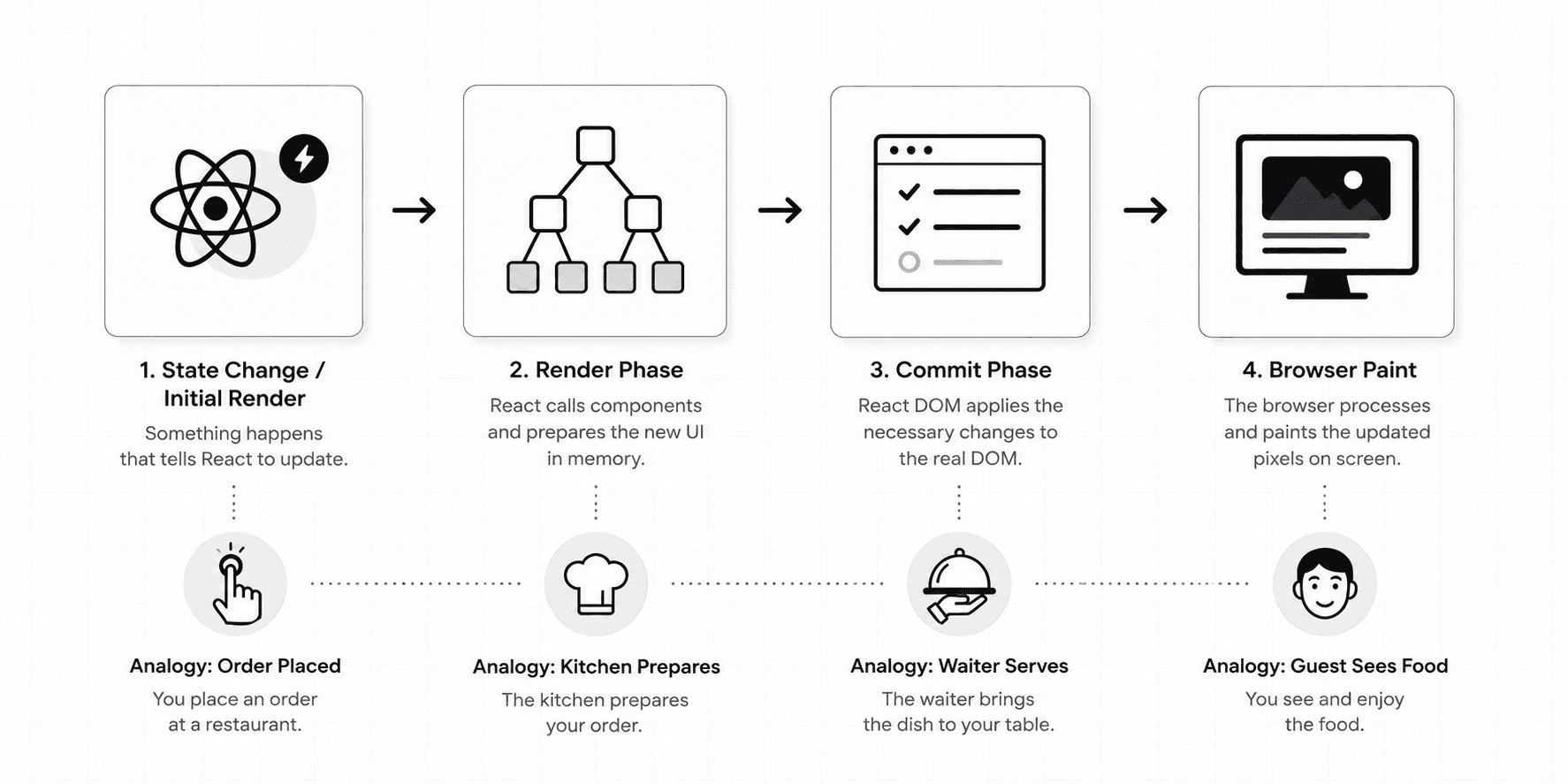
This is important to understand because many React misunderstandings come from mixing these phases together. Most developers say, “React rendered the DOM.” But that sentence is not quite accurate. React rendering and DOM updating are related, but they are not the same thing. So let’s start from the beginning.
A render does not happen randomly. React starts rendering when something tells it, “Hey, the UI might need to be recalculated.” There are two common triggers:
The initial render happens when your app starts for the first time. For example:
import { createRoot } from "react-dom/client"
import App from "./App"

const root = createRoot(document.getElementById("root"))

root.render(<App />)
This tells React, “Take my App component and start building the UI.” The second trigger is more common during app usage: a state update.
const [count, setCount] = useState(0)

function handleClick() {
  setCount(count + 1)
}
When setCount runs, React does not immediately jump into the DOM and change the number on the screen. Instead, React schedules a new render. That word matters: schedules. React says, “Something changed. I need to calculate what the UI should look like now.” It does not mean the screen has changed yet.
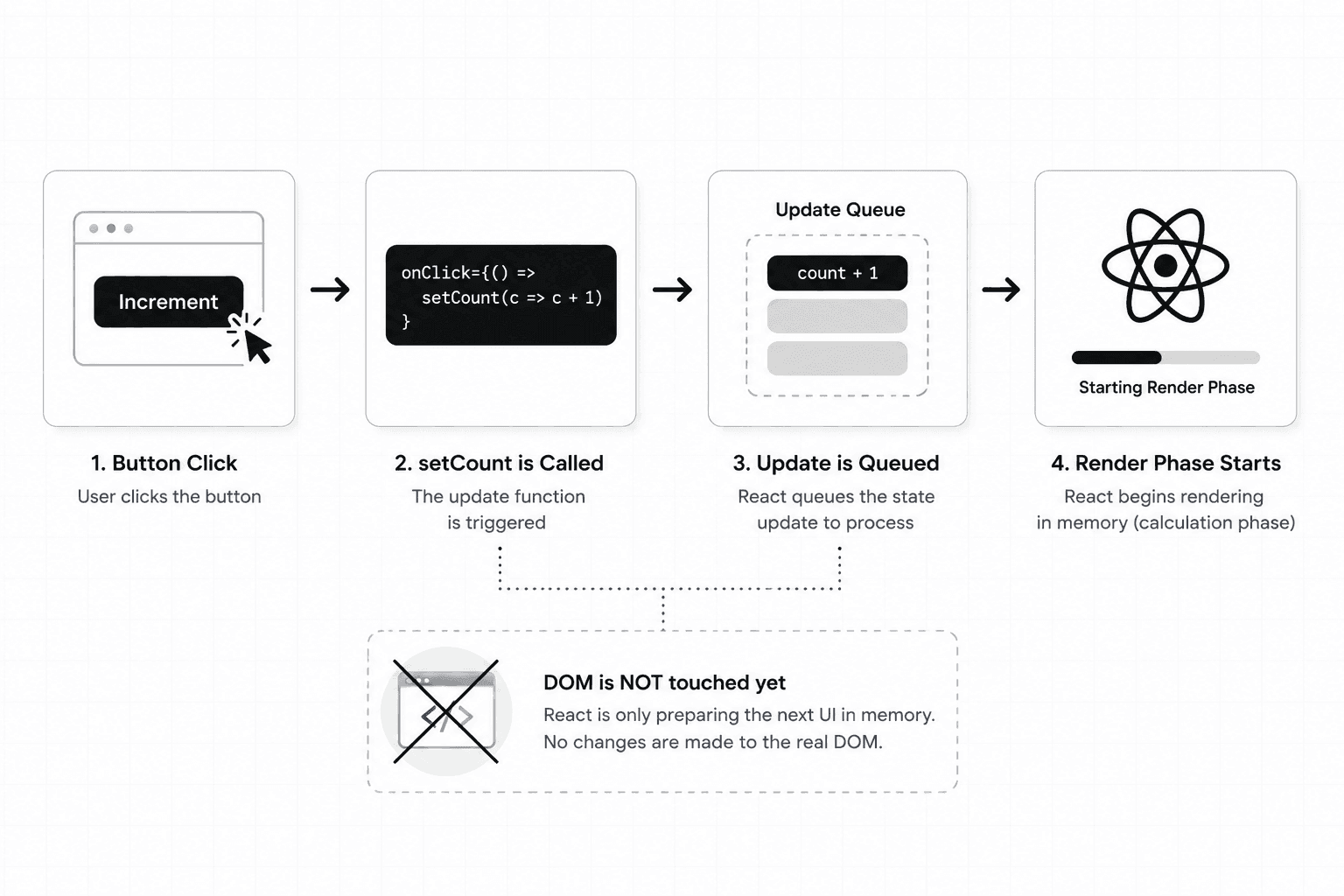
So the first lesson is this: a state update does not directly update the screen. It tells React to begin the process of figuring out what should change. That leads us to the most misunderstood part of React.
Here is the common belief:
When React renders, it updates the DOM.
That sounds reasonable. But it is not exactly true.
In React, rendering means calling your component functions to figure out what the UI should look like. That’s it. React is not touching the real DOM yet.
Let’s say you have this component:
function Greeting() {
  return <h1>Hello, Ayush</h1>
}
When React renders this component, it calls the function:
Greeting()And the function returns a React element. That React element is just a JavaScript object describing the UI. Conceptually, it looks something like this:
{
  type: "h1",
  props: {
    children: "Hello, Ayush"
  }
}
This object is not a DOM node. It is not an actual <h1> sitting inside the browser page. It is only a description.
Think of it like a blueprint. If an architect draws a blueprint of a house, the house does not magically appear. The blueprint only describes what should be built. React elements work the same way. They describe what the UI should look like, but they are not the actual UI.
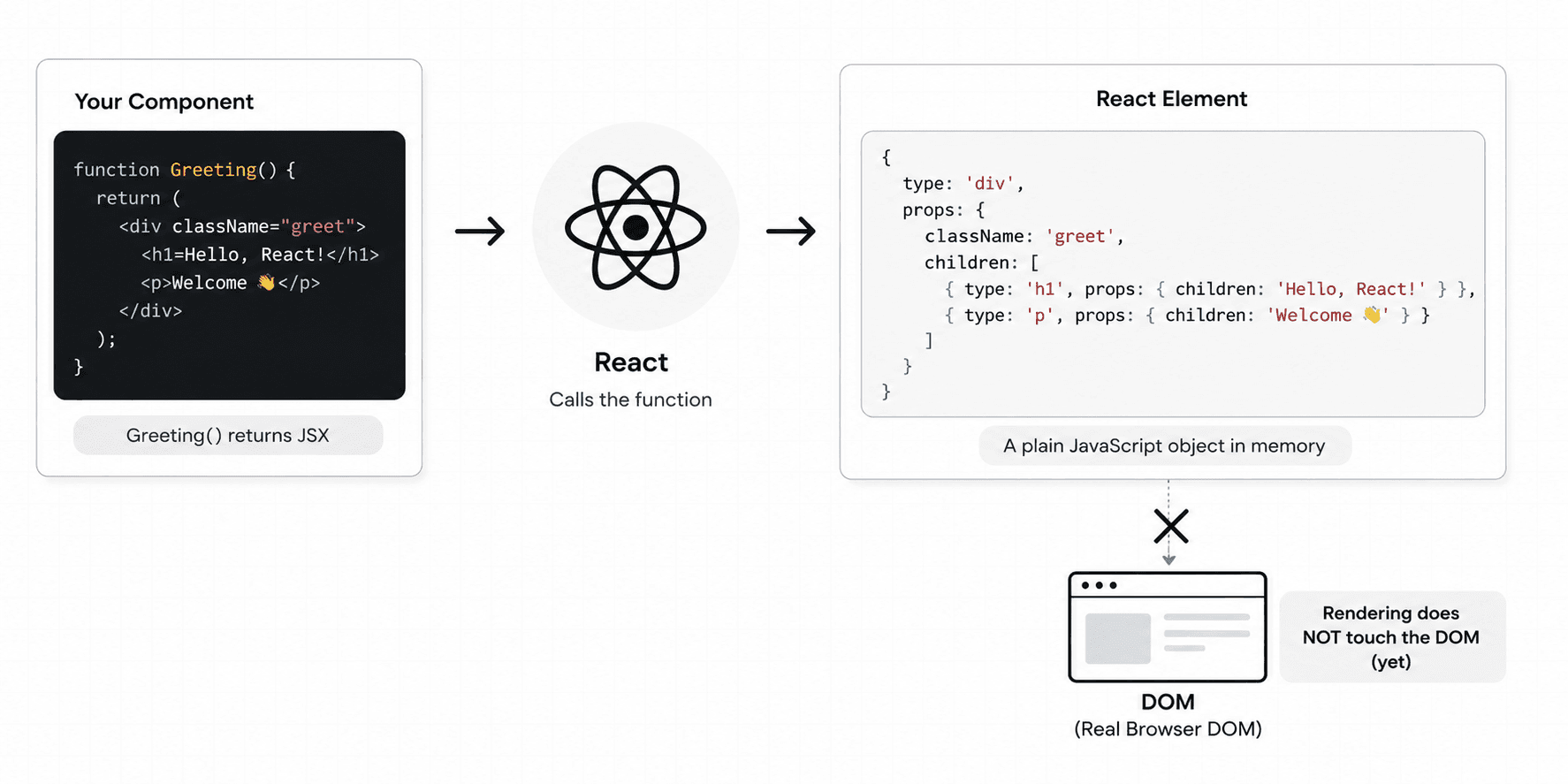
This is why the render phase is usually fast. React is mostly running JavaScript functions and creating JavaScript objects. The expensive part comes later, when something actually needs to be changed in the browser DOM. But before we get there, we need to understand what React creates during the render phase.
A real app is not made of one component. It is a tree of components. For example:
function App() {
  return (
    <main>
      <Navbar />
      <Dashboard />
      <Footer />
    </main>
  )
}
When React renders App, it does not stop at App. It also renders Navbar, Dashboard, Footer, and the components inside them. Each component returns React elements. Together, these React elements form a tree.
Many developers call this the Virtual DOM. A more precise name is the React element tree. The term “Virtual DOM” is popular, and you will still see it everywhere. But the important thing to remember is this: the Virtual DOM is not a magical second DOM. It is a tree of JavaScript objects that describe what the UI should look like.
So when a render happens, React builds a fresh description of the UI, not the real UI, just a description of the UI.
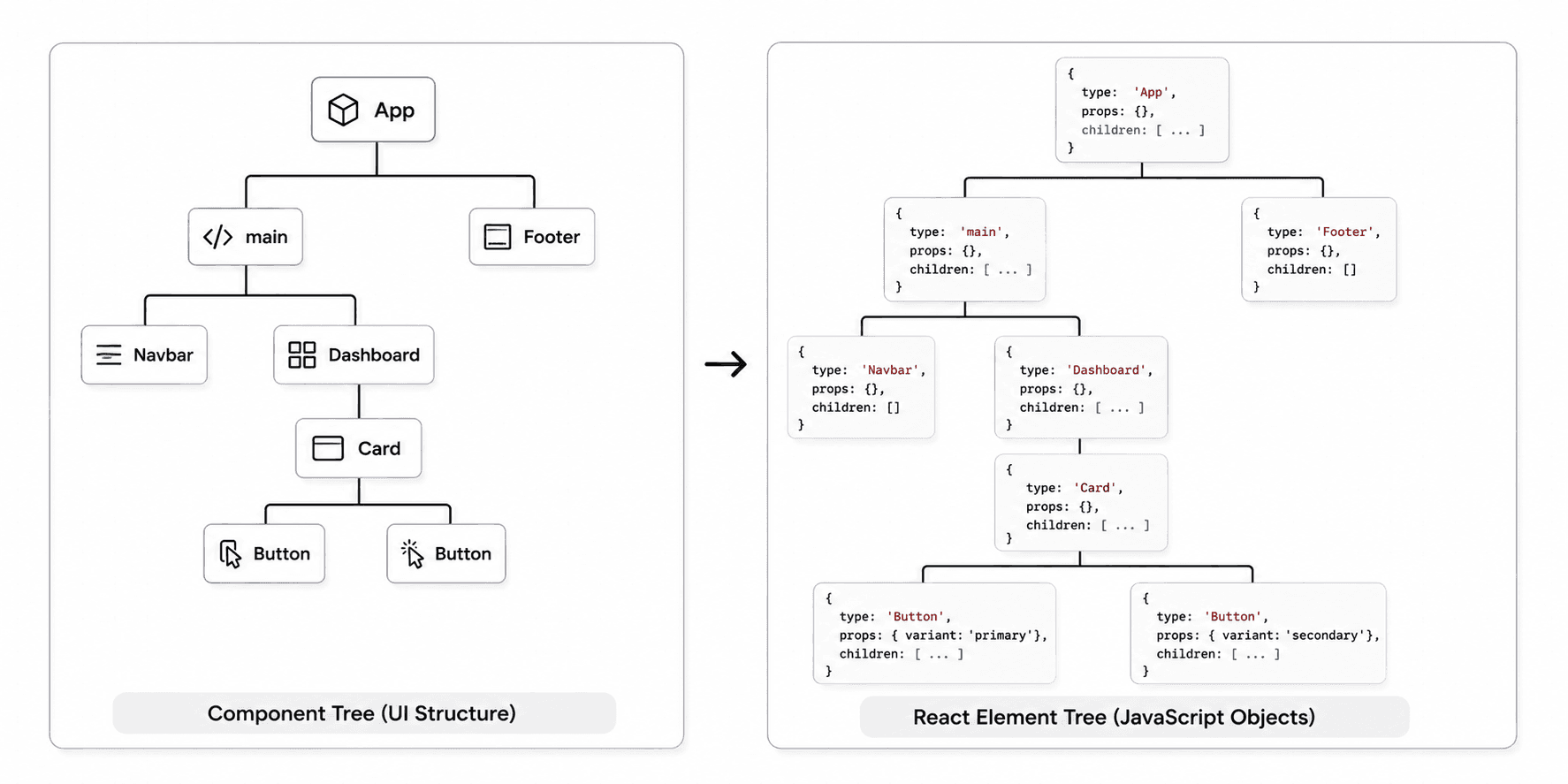
This is why React can do a lot of work before touching the DOM. It first asks:
“What should the UI look like now?”
Only after answering that question does React move toward:
“What needs to change in the actual browser?”
That separation is the heart of React’s rendering model.
That is where reconciliation comes in. We will understand that in Phase 2.
Here is another point that surprises many developers. When a component re-renders, React will usually render its child components too. Let’s say you have this:
function Dashboard() {
  const [search, setSearch] = useState("")

  return (
    <section>
      <SearchBox value={search} onChange={setSearch} />
      <StatsPanel />
      <ActivityFeed />
    </section>
  )
}
When search changes, Dashboard re-renders. And because Dashboard returns SearchBox, StatsPanel, and ActivityFeed, React will call those child component functions again too.
At first, this sounds scary. You might think:
“Wait. If every child re-renders, won’t the whole app become slow?”
Not necessarily. Because rendering is not the same as updating the DOM. Calling component functions and creating React elements is usually much cheaper than changing real DOM nodes.
The real question is not:
“Did this component function run again?”
The better question is:
“Did React actually need to change the DOM?”
Those are very different questions.
A component can re-render, but React may still decide that nothing in the real DOM needs to change. Imagine a chef checking a recipe again and realizing the final dish does not need any change. The review happened, but the served food stayed the same. That is where reconciliation comes in.
Before we explain reconciliation, let’s ask a simple question:
Why doesn’t React just rebuild the entire DOM after every state update?
That would be much simpler. State changed? Delete everything. Create everything again. Done.
But the browser DOM is not just a plain JavaScript object. DOM nodes are connected to layout, styles, events, browser rendering, accessibility trees, and visual painting. Changing the DOM can cause the browser to do extra work. It may need to recalculate styles. It may need to recalculate layout. It may need to repaint pixels.
If React replaced the whole DOM on every update, even small interactions would become unnecessarily expensive. Imagine editing one word in a Google Doc, and the app reprints the entire document from scratch every time you type a letter. That would be wasteful.
React’s goal is smarter:
Reuse as much of the existing UI as possible, and update only what actually changed.
This is why React needs a comparison process. That process is called reconciliation.
Reconciliation is the process React uses to figure out what changed between the previous UI and the new UI. After a state update, React has a new React element tree. But React also has an existing internal representation of what is currently on the screen. React now needs to compare the new description with the current UI structure and produce a plan.
That plan answers questions like:
This comparison process is often called diffing. Diffing means comparing two versions and finding the difference. But there is an important detail here.
React does not simply compare an old Virtual DOM with a new Virtual DOM as two separate trees sitting in memory. That is the simplified explanation many developers hear. The more accurate version is:
React compares the newly created React element tree with the current Fiber tree.
So now we need to understand Fiber.
Fiber is React’s internal architecture for organizing rendering work. A Fiber node is like a unit of work. Each component or DOM element in your UI has a corresponding Fiber node.
The Fiber node stores important information, such as:
You can think of the Fiber tree as React’s internal notebook. The React element tree says:
“This is what the UI should look like now.”
The Fiber tree helps React remember:
“This is what currently exists, what state it has, and what work needs to happen next.”
That difference is important. React elements are mostly descriptions. Fibers are work records. React elements are recreated during render. Fibers are reused and updated over time.
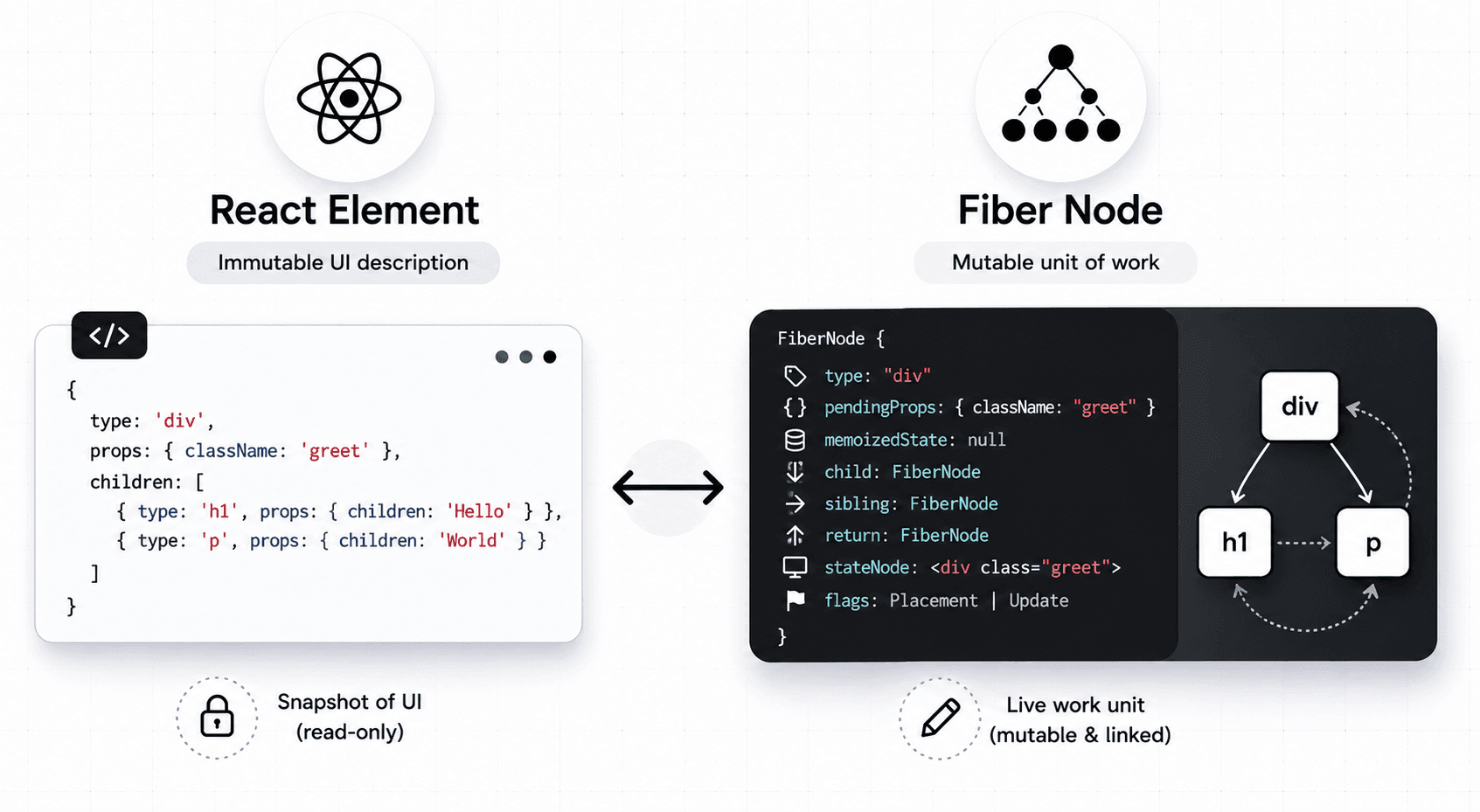
This is why Fiber is such a big deal. It allows React to break rendering work into small units, pause work, resume work, prioritize important updates, and prepare changes without immediately touching the DOM. In other words, Fiber helps React stay responsive.
When we imagine a tree, we usually imagine each parent directly holding an array of children. Something like this:
{
  type: "div",
  children: [
    { type: "p" },
    { type: "img" }
  ]
}
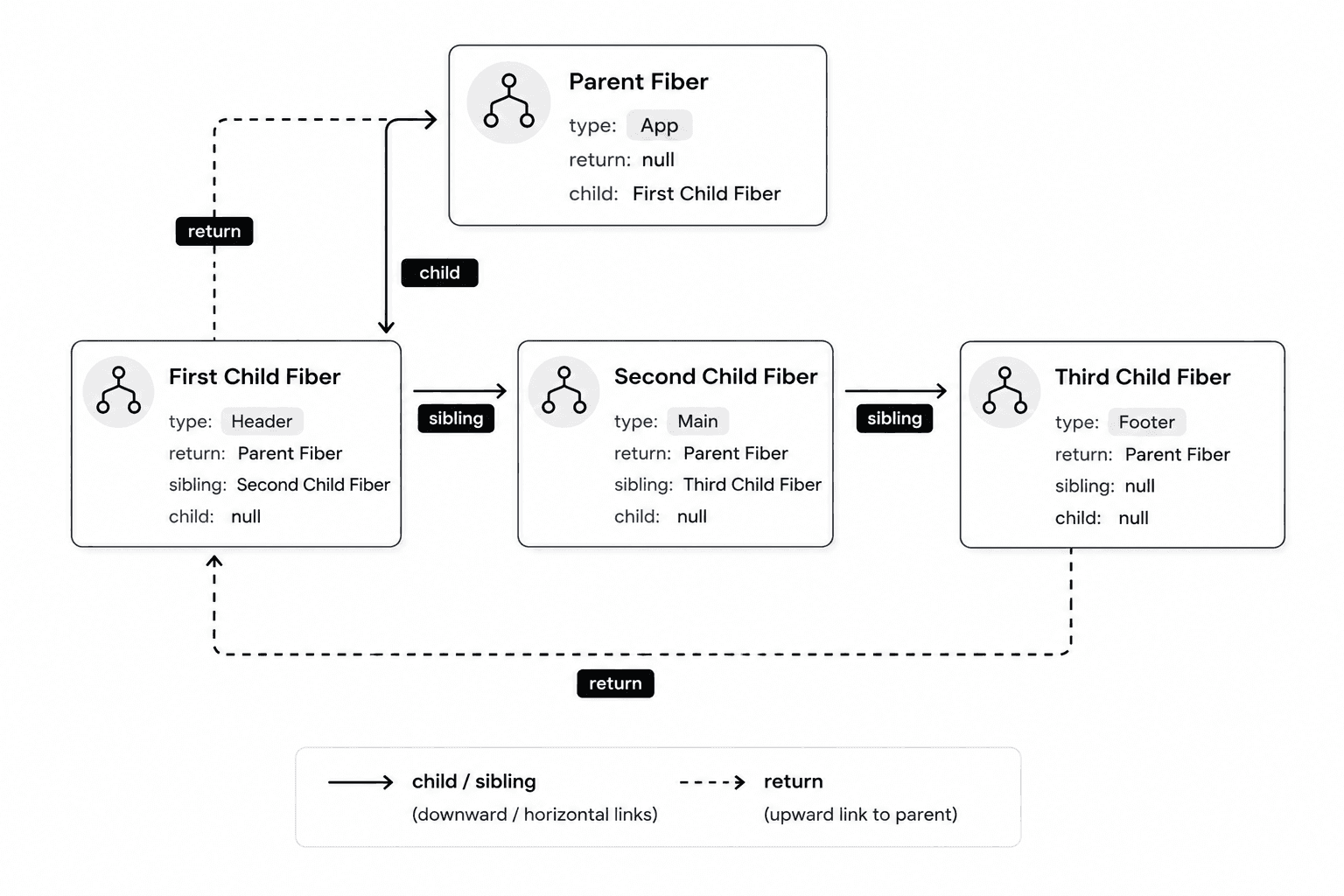
But Fiber does not work exactly like that. The Fiber tree is structured more like a linked list. Each Fiber node commonly points to:
So instead of a parent holding all children in an array, React can walk through the tree step by step using pointers. Conceptually:
Parent Fiber
   |
 child
   |
First Child Fiber --sibling--> Second Child Fiber --sibling--> Third Child Fiber
   |
 return
   ↓
Parent Fiber
Why does this matter? Because React needs to process rendering work in small chunks. If each Fiber is a unit of work, React needs a way to move from one unit to the next. The child, sibling, and return pointers make that possible.
Think of it like a task list where each task knows:
“Here is my first subtask.”
“Here is the next task beside me.”
“Here is where I go back when I’m done.”
That structure gives React a flexible way to walk through the UI without relying on one giant recursive operation.
Now we have enough context to understand what happens during the render phase more accurately.
During the render phase, React does two major things. First, it calls component functions and creates a new React element tree. Second, it reconciles that new tree with the current Fiber tree.
Let’s use a practical example.
Imagine this component:
function App() {
  const [showModal, setShowModal] = useState(true)

  return (
    <main>
      <button onClick={() => setShowModal(false)}>Hide Modal</button>

      <VideoPlayer />

      {showModal && <Modal />}
    </main>
  )
}
Initially, showModal is true. So the UI contains:
Now the user clicks the button. setShowModal(false) runs. React schedules a render. During the render phase, React calls App() again. This time, showModal is false, so the new React element tree no longer includes <Modal />.
Now React compares this new tree with the current Fiber tree. It notices:
The button still exists, but maybe its text or props need checking.
The video player still exists and may be reusable.
The modal existed before, but it no longer appears in the new tree.
So React marks the modal for deletion. At this point, React has not deleted the modal from the DOM yet. It has only prepared a plan. That is one of the most important ideas in this entire article. The render phase prepares changes. It does not apply them to the DOM.
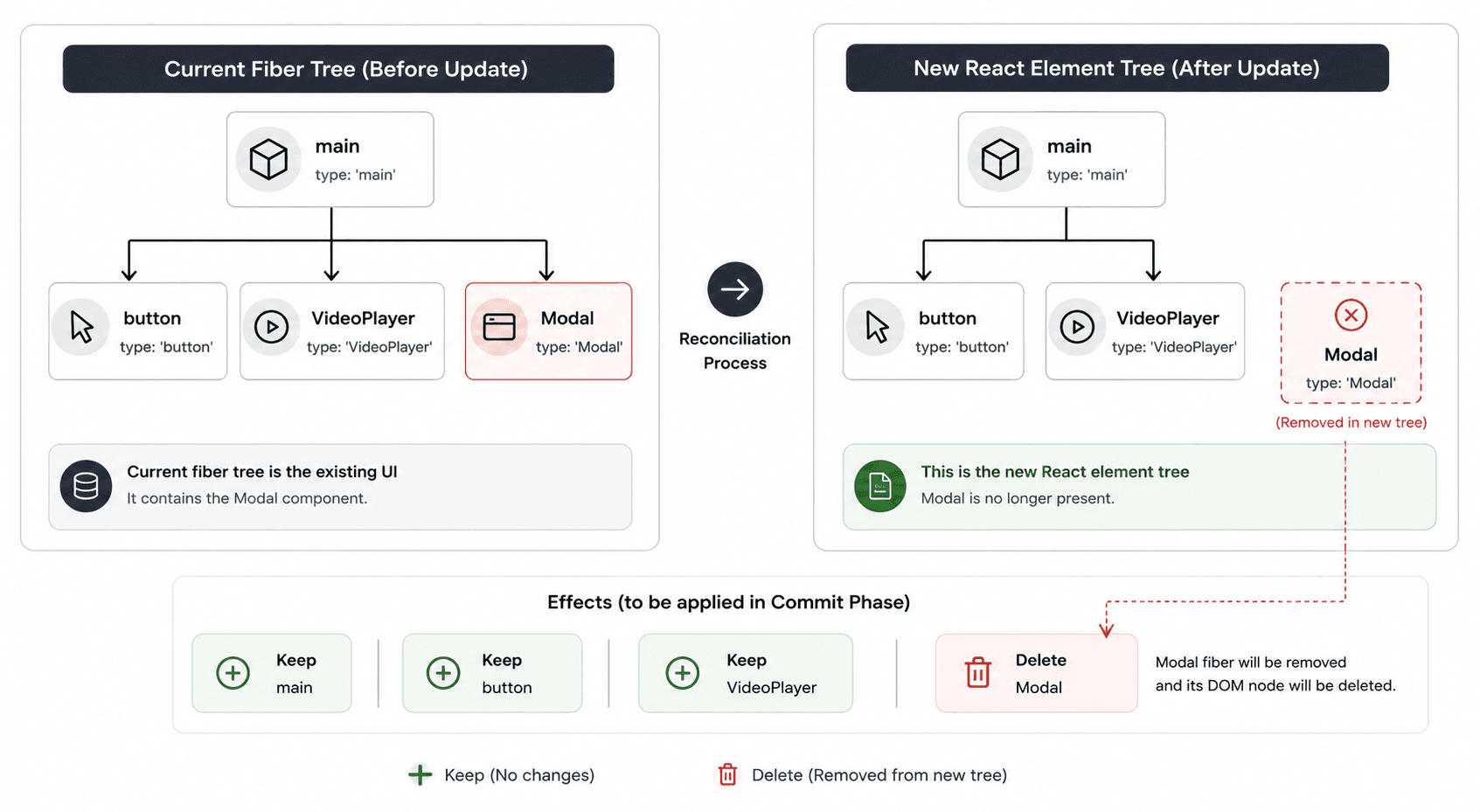
So when we say “React rendered,” we mean React calculated the next UI and prepared the work needed to update the real UI later. That work is collected for the commit phase.
After reconciliation, React knows what needs to happen. It may need to:
React collects this work into something we can think of as an effects list. The effects list is basically React’s mutation plan. It says:
“Here are the actual changes that must be applied.”
For our modal example, the plan might include:
DELETE Modal DOM subtree
UPDATE button text or props if needed
KEEP VideoPlayer DOM as it is
Again, this is still not visible to the user. Everything so far has happened in memory. The browser page has not changed yet.
Think of this like a renovation plan. An architect walks through the house, compares the current layout with the new design, and writes down:
Remove this wall.
Paint this room.
Keep this window.
Replace this door.
But until the workers arrive, the house still looks the same. The commit phase is when the workers arrive.
Let’s pause for a second. We have covered a lot. Here is the flow so far:
That last point is worth repeating. Until the commit phase starts, the screen has not changed. Now let’s move to the phase where React finally touches the DOM.
The commit phase is where React applies the prepared changes to the host environment. For web apps, that host environment is the browser DOM. This work is handled by React DOM.
React itself is platform-independent. It can describe UI for different environments, such as web, mobile, or even video rendering tools. React DOM is the renderer that knows how to take React’s prepared work and apply it to the browser DOM.
That separation matters. React calculates what should change. React DOM performs the actual DOM operations.
During the commit phase, React DOM may:
Unlike the render phase, the commit phase is synchronous. That means once React starts committing changes, it does not pause halfway and let the user see a broken half-updated UI. React applies the required DOM mutations as one consistent operation.
This is like the restaurant waiter serving the final dish. The kitchen may prepare things step by step, but the guest should not receive half a sandwich, then the plate, then the sauce, then the napkin. The final result should arrive in a consistent state.
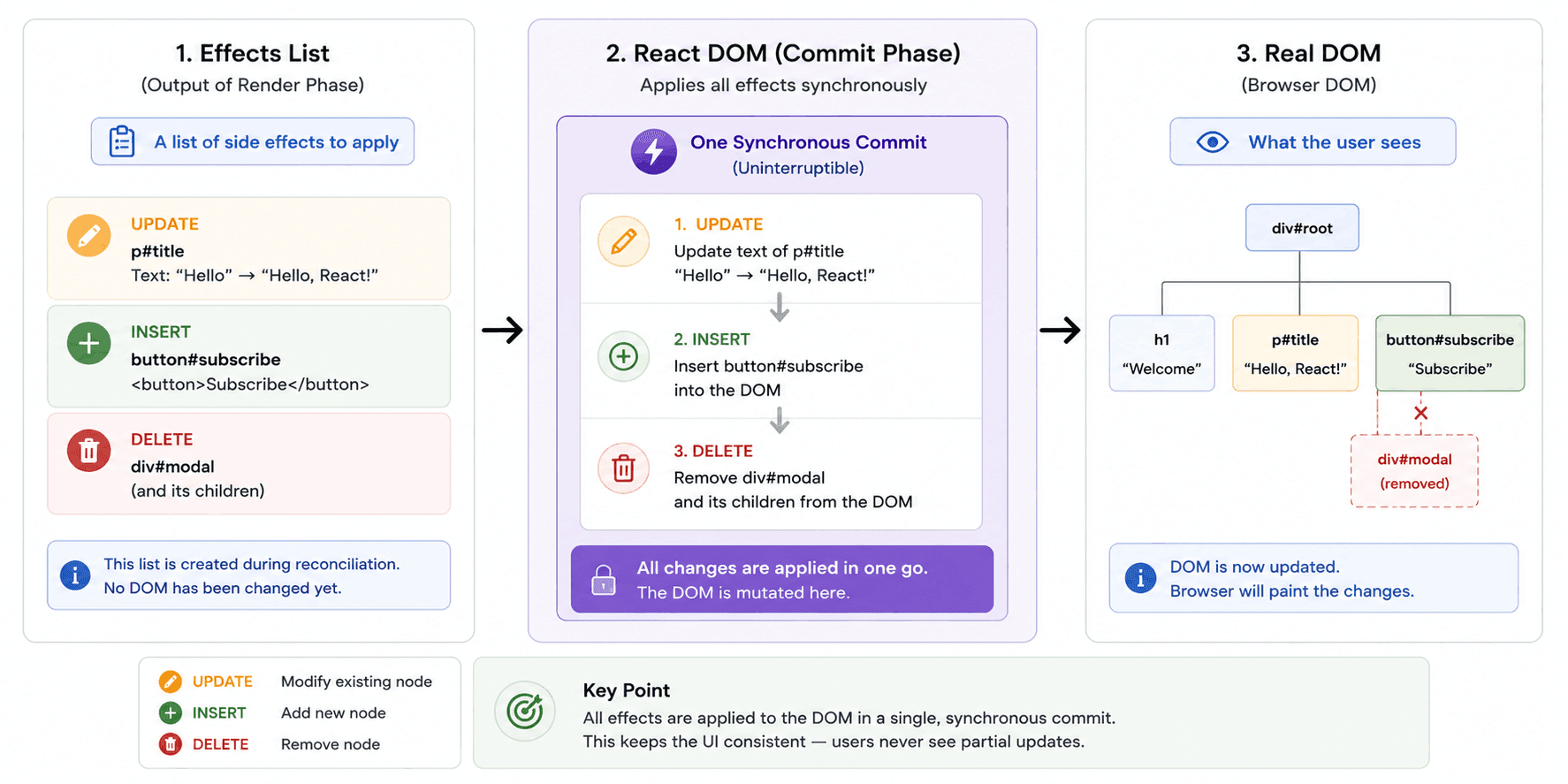
Now the DOM has changed. But there is still one final step before the user sees the result. The browser has to paint.
After React DOM commits the changes, the browser notices that the DOM has changed. But updating the DOM and painting the screen are not the same thing.
The browser may need to do several things before the update becomes visible:
This is browser work, not React work. React’s job is to calculate and commit the DOM changes. The browser’s job is to turn the DOM, CSS, layout, and paint information into pixels.
So the full chain looks like this:
State Update
   ↓
React Render Phase
   ↓
Reconciliation with Fiber
   ↓
Effects List
   ↓
React DOM Commit Phase
   ↓
Browser Style / Layout / Paint
   ↓
Updated Screen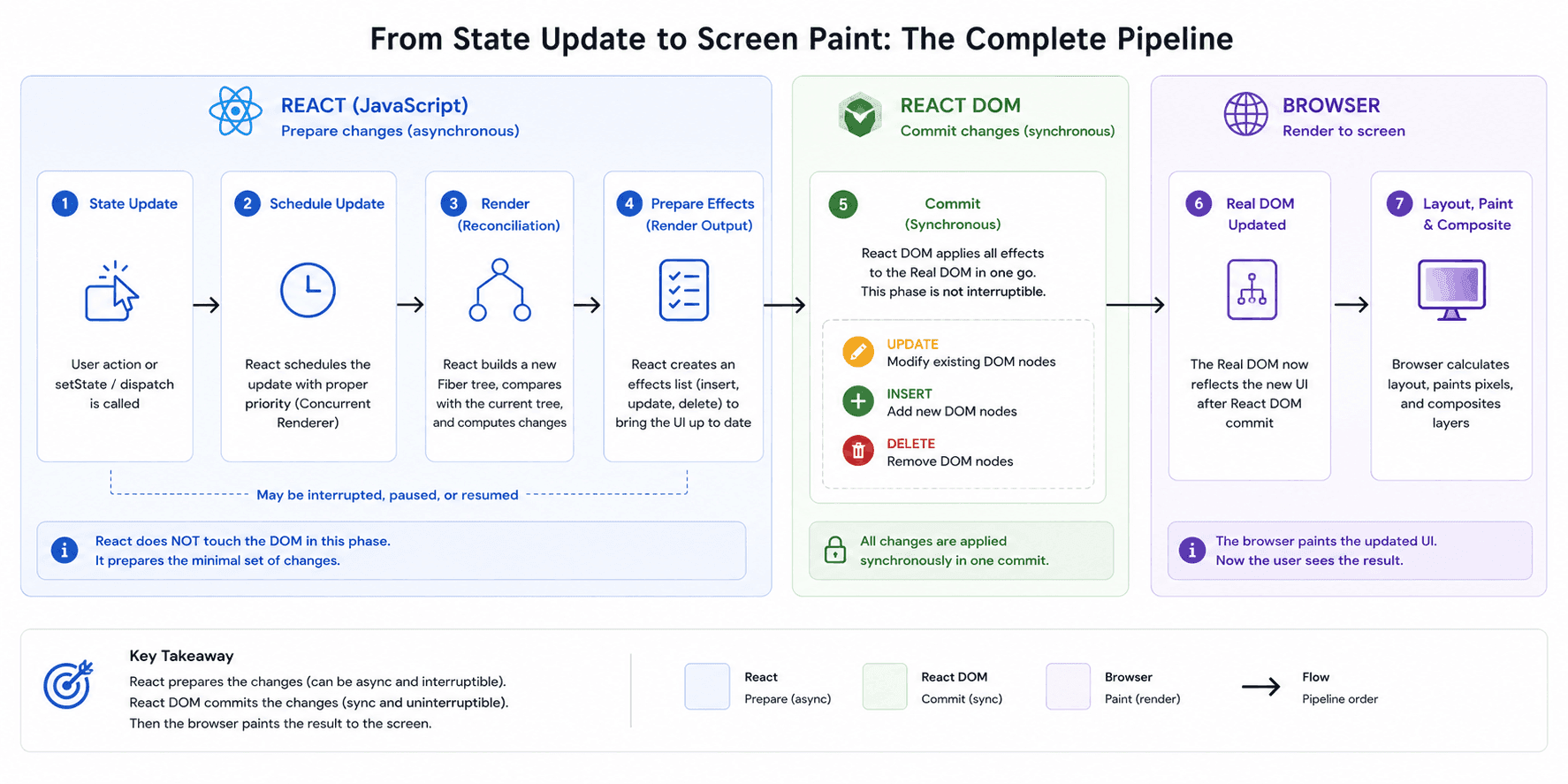
This final distinction helps prevent a lot of confusion. React does not paint pixels. React does not directly control the browser’s rendering engine. React prepares and commits UI changes. The browser paints them.
One of Fiber’s biggest advantages is that React can split rendering work into smaller pieces. The render phase can be paused, resumed, or even abandoned if a newer update becomes more important.
This is especially useful for large UIs. Imagine typing into a search input while a huge list is being filtered. If React had to finish one giant render task before handling your typing, the input might feel laggy.
Fiber allows React to organize work with priority. Some updates are urgent, like typing, clicking, or selecting. Some updates are less urgent, like rendering a large filtered list. This is the foundation behind modern React features like transitions and Suspense.
The important part is this:
React can interrupt the render phase because it has not changed the DOM yet. There is no risk of the user seeing a half-updated screen. But once React enters the commit phase, it must finish. The commit phase cannot be interrupted because the DOM is being changed.
So we can think of it like this:
Render phase: flexible planning.
Commit phase: final execution.
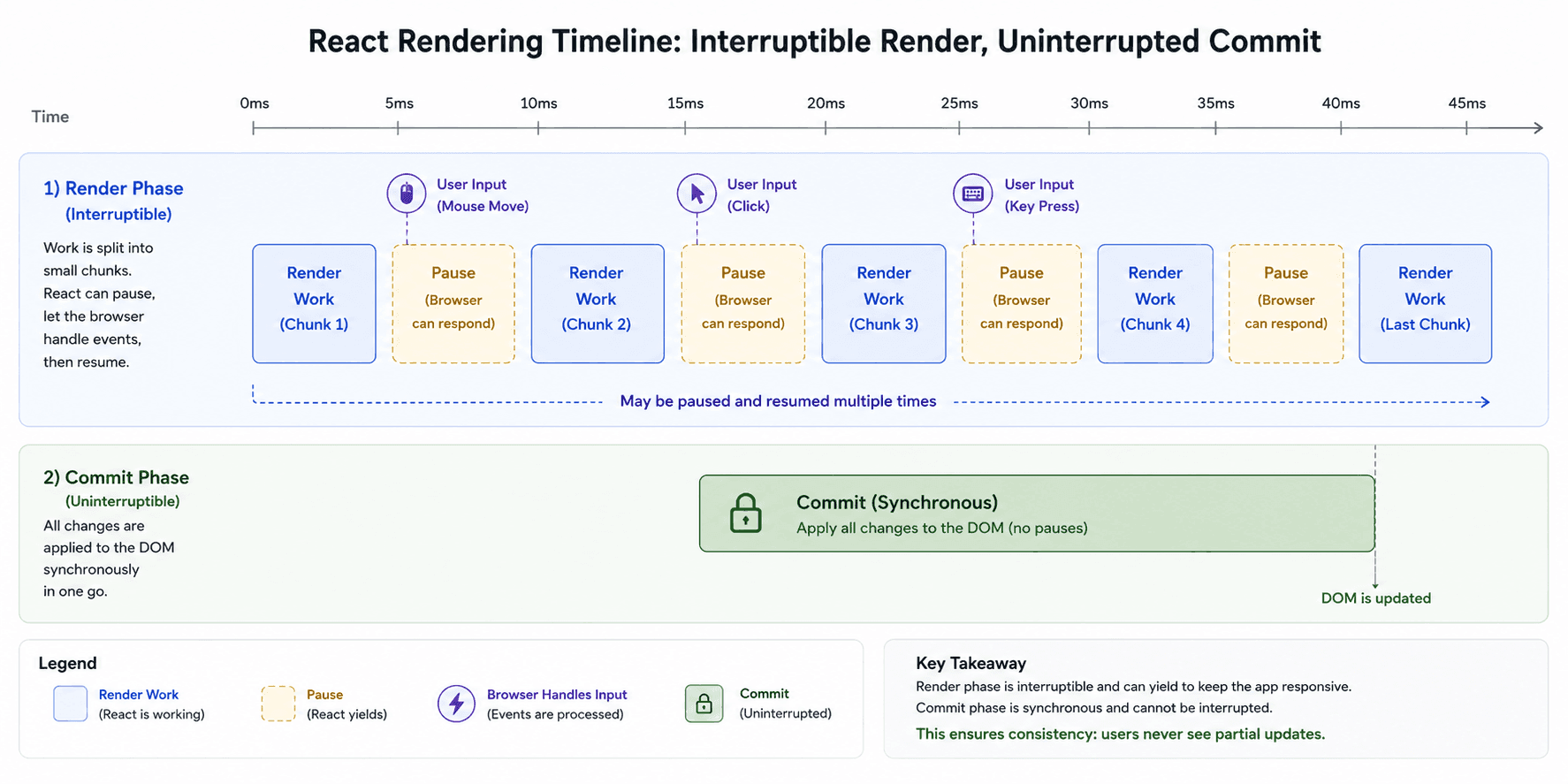
That is why Fiber is not just an implementation detail. It is the reason React can prepare complex UI updates while keeping the app responsive.
Many developers panic when they hear that a component re-rendered. But a re-render is not automatically a performance problem. A re-render means React called your component function again. That can be totally fine.
The expensive part is usually unnecessary work inside rendering, unnecessary DOM changes, expensive calculations, large lists, unstable props, or avoidable child renders in performance-sensitive areas. For example, this can become expensive:
function ProductList({ products }) {
  const sortedProducts = products.sort((a, b) => a.price - b.price)

  return (
    <ul>
      {sortedProducts.map((product) => (
        <ProductCard key={product.id} product={product} />
      ))}
    </ul>
  )
}
The problem here is not simply that ProductList renders. The problem is that sorting may run every time, and if the list is large, that can become costly.
In that case, tools like useMemo, pagination, virtualization, or better state placement may help. But you should not optimize blindly. First understand what is actually slow. Then optimize the real bottleneck.
A good mental model is:
Rendering is React thinking.
Committing is React DOM changing the page.
Painting is the browser showing the result.
Do not blame the thinking phase unless you know the thinking is expensive.
When your UI feels slow, ask these questions in order.
First: Did a state update happen more often than expected?
For example, are you updating state on every mouse move, scroll event, or keystroke without throttling or debouncing?
Second: Did state live too high in the tree?
If state is placed in a parent component, many children may re-render when that state changes.
Sometimes moving state lower can reduce unnecessary work.
Third: Are expensive calculations running during render?
Sorting, filtering, formatting, and transforming large data during every render can hurt performance.
Fourth: Are child components receiving unstable props?
For example:
<Chart options={{ showLegend: true }} />This creates a new object every render. Even if the value looks the same, the reference is different.
Fifth: Is the DOM actually changing too much?
Large lists, frequent layout changes, animations, and heavy DOM updates can cause browser-side performance issues.
This kind of debugging is much better than saying, “React is slow.” React is usually doing exactly what your state structure asks it to do. The key is learning how to ask better questions.
Now we can connect everything into one full story.
A user clicks a button. The button calls setState. React schedules an update. During the render phase, React calls component functions and creates a new React element tree. Then React reconciles that new tree with the current Fiber tree. The Fiber reconciler figures out what changed and prepares an effects list. At this point, the DOM is still untouched. Then React enters the commit phase. React DOM applies the needed changes to the real DOM synchronously. After that, the browser processes the DOM changes and paints the updated screen.
That is the real journey from state change to screen paint. Not instant magic. Not direct DOM mutation. A pipeline.
Once this pipeline clicks, React becomes much easier to reason about.
You stop thinking:
“Why did React update everything?”
And you start thinking:
“Which phase am I looking at?”
“Was this just a re-render?”
“Did the DOM actually change?”
“Is the bottleneck in React, React DOM, or the browser?”
That is the difference between guessing and debugging.
React rendering is not one big magical update. It is a pipeline where each stage has a different job.
The key mental model is simple:
State Change → Render → Reconciliation → Commit → Browser PaintFinal takeaways:
So remember this:
Render is React thinking. Commit is React DOM changing the page. Paint is the browser showing the result.
Once you separate these stages, React re-renders become much easier to debug and reason about.